An AI on Your Laptop
Run a language model without the internet and find out what it actually is
A language model is a file full of numbers that runs on your own laptop without the internet; its size decides how good, how fast and how hungry it is.
Short description
You switch off the internet and still get answers from a language model on your own laptop. Then you look at the file that holds the whole model and compare a small and a larger version of the same model on the same three questions.
The slides lead through the experiment and what it shows: the file, the numbers inside it, why bigger models are slower, and the difference between open and closed models.
Steps
Basic experiment
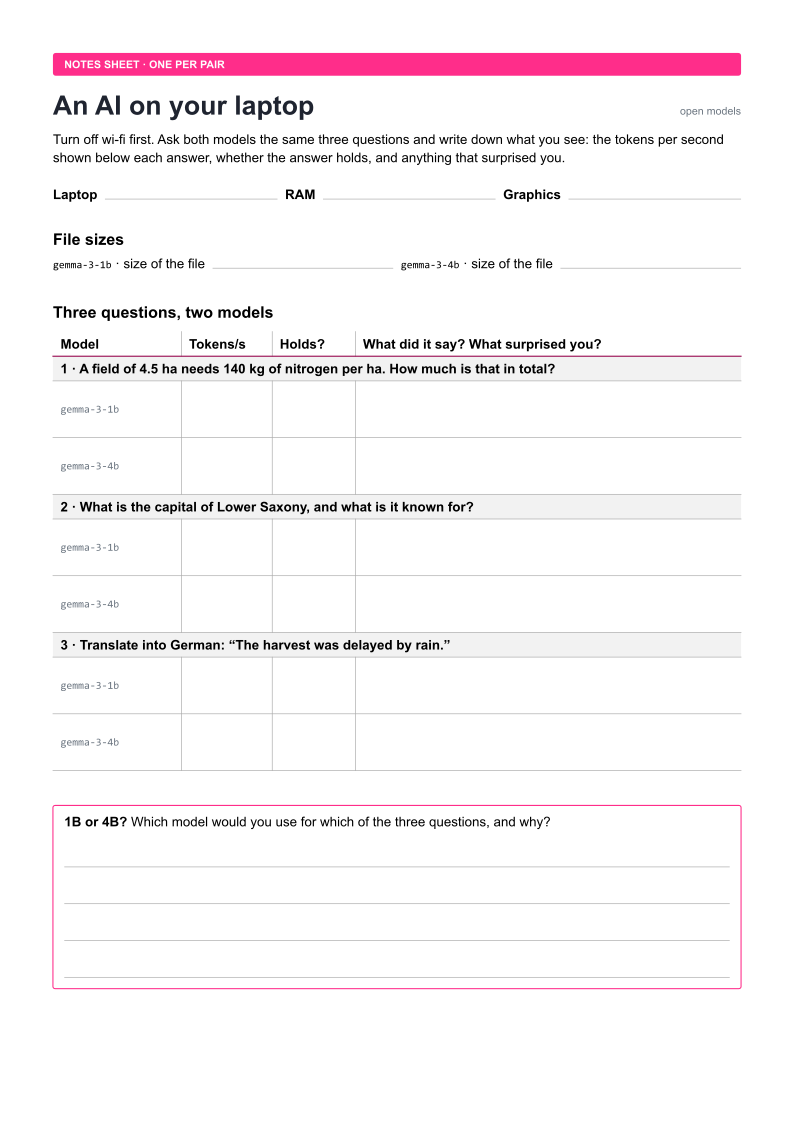
Work in pairs and write your observations on the notes sheet.
- Turn off wi-fi, load Gemma 3 1B in LM Studio and ask it what nitrogen fertiliser does for a wheat plant, in two sentences.
- Find the model file (LM Studio → My Models → show in folder) and note its size and its name.
- Ask both models, Gemma 3 1B and then Gemma 3 4B, the same three questions and note the tokens per second shown below each answer:
- A field of 4.5 ha needs 140 kg of nitrogen per ha. How much is that in total?
- What is the capital of Lower Saxony, and what is it known for?
- Translate into German: “The harvest was delayed by rain.”
- Compare: which model was faster, and which answers held?
Extensions
Each extension changes one thing, so that you can compare the result with the basic experiment.
- Turn the dials: load Gemma 4 E2B (
google/gemma-4-e2b), switch LM Studio to developer mode to see all settings, then ask the same question three times at temperature 0 and three times at temperature 1, set top k to 0, top p to 1 and min p to 0 and raise the temperature step by step until the answer falls apart, limit the length of the answer to 20 tokens (Limit Response Length), and finally load the model with a very short context, paste a long text, ask about its beginning and repeat this with each strategy under Context Overflow (Rolling Window, Truncate Middle, Stop at Limit). - Rounding: download Gemma 3 4B in a second quantization (for example 8 bit instead of 4 bit) and compare size, speed and answers.
- Another family: ask Qwen3 4B (
qwen/qwen3-4b-2507, 2.3 GB) the same questions and compare it with Gemma 3 4B of the same size. - Cloud against laptop: ask a cloud chatbot the same questions and fill in a table with quality, speed, cost and where your data goes.
- Your own document: give the local model a text that must not leave your laptop, such as a draft of your thesis, and ask it for a summary.
- Watch the machine: open the task manager while the model answers and watch memory, processor and graphics card.
- On your phone: install Google’s app AI Edge Gallery (Android and iOS), load a small Gemma model and ask it the same questions in flight mode.
Discussion
Write down your own answers first, then discuss them in your group.
- What surprised you about the size, speed or quality of the local model?
- Which data would you trust a local model with, but not a cloud service?
- When should a farm or a food company run its own model instead of renting one?
Concepts
- Open Models: what a model is, why its size matters, and the difference between open and closed weights.
- Next-Token Prediction: how the model writes its answer one token at a time, and what the settings in LM Studio change.
- AI Agents: an agent can use a model on your laptop instead of one in the cloud.
Material
- A laptop with at least 8 GB of memory, charged, and LM Studio installed (free, for Windows, macOS and Linux).
- Two models from the same family, downloaded before the session, not in the room: Gemma 3 1B (
google/gemma-3-1b, about 0.75 GB) and Gemma 3 4B (google/gemma-3-4b, about 2.4 GB). - The notes sheet, one per pair.
The file sizes are those listed on lmstudio.ai and can differ slightly with the version you download.
These instructions are also available as a PDF, with a page for the discussion.